
← ShowcaseAI Companion / Windows Prototype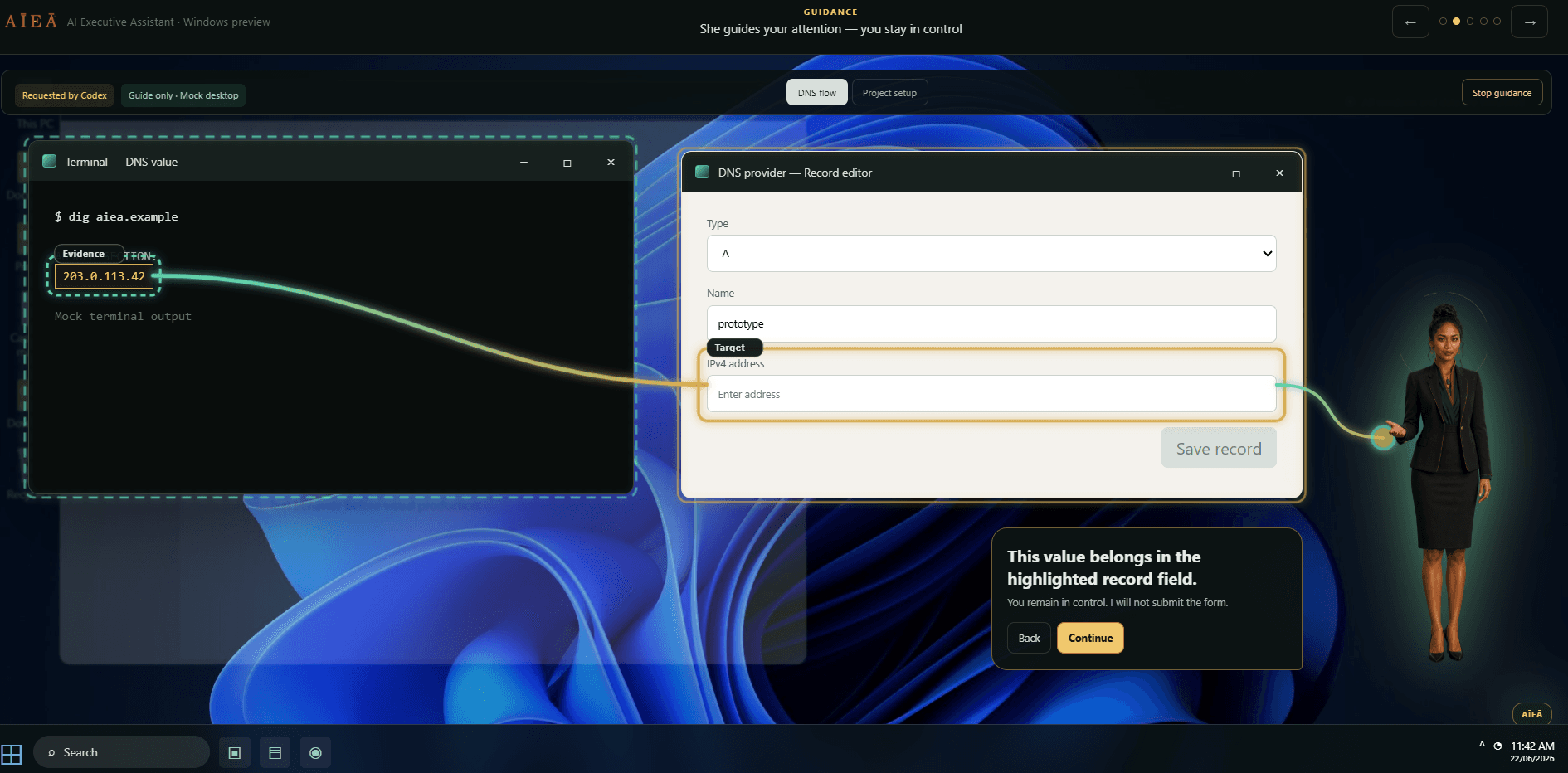
AĪEĀ — AI Executive Assistant
A five-scene Windows 11 prototype demonstrating what a trustworthy AI Executive Assistant looks and feels like — presence without intrusion, action without assumption.
Project Summary
What It Is
AĪEĀ is an AI Executive Assistant concept built for the Windows 11 desktop — a figure that lives quietly in the system dock and surfaces only when she's needed. The showcase is a five-step interactive prototype walking through her core interaction modes: presence, guidance, approval, watch, and trust.
Why It Exists
To give potential clients and collaborators a felt sense of what a trustworthy AI companion looks like in practice — not a chatbot in a browser tab, but an AI that works within your operating environment, asks before it acts, and keeps a transparent record of everything it does.
What Was Built
A full-screen Windows 11 desktop simulation built in React and Vite, with five narrative scenarios driven by a stepped showcase shell. Features include ElevenLabs voice narration, Web Audio amplitude-linked mouth animation, SVG aura trace animations, fake window entrance animations, and a Trust Centre for reviewing and clearing AĪEĀ's action history.
Build Story
The Original Problem
AI assistants that act in the background are hard to trust — they do things you didn't ask for, they're opaque about what they've done, and they rarely ask permission before taking action. Most AI companion demos are chat interfaces; none of them feel like a person working alongside you in your actual desktop environment.
The Creative / Product Insight
Design the trust model first: every action AĪEĀ takes requires explicit user approval, every action is logged in a Trust Centre the user can inspect and clear, and her presence on-screen is minimal and ambient — a dock portrait, a status ring, a speech bubble — until you need her.
The Role of AI Agents
Claude Code drove the entire build — component architecture, React state management, CSS animation system, ElevenLabs integration, Web Audio API mouth animation, and SVG aura trace system — from a design language brief and a set of interaction requirements.
The Human-in-the-Loop Decisions
All product decisions — the five-scenario arc, the Trust Centre model, the approval-gate philosophy, the visual tone, the voice direction, the brand identity, and the overall interaction grammar — were made by the founder. Claude executed; the founder directed.
Production Notes
Tech / Method Stack
React · TypeScript · Vite · ElevenLabs voice synthesis · Web Audio API · SVG animation · CSS custom properties · Windows 11 visual language
Design Process
Started from a design language document establishing the colour palette, typographic system, and Windows 11 visual context. Each scenario — presence, guidance, approval, watch, trust — was prototyped independently and then wired together through a stepped showcase shell with voice narration cues.
Prompting / Agent Workflow
Each feature (aura trace, voice integration, mouth animation, window entrance animations, showcase shell) was built in discrete Claude Code sessions, with the founder reviewing each feature in the browser before moving to the next. All brand assets were produced separately and integrated via public asset references.
Testing / Validation / Review
Each scenario was walked through in the browser at each stage of development, checking voice timing, animation sequence, mouth position, and transition behaviour. The Windows 11 desktop context — wallpaper, taskbar, desktop icons — was tuned to reinforce the simulation fidelity.
Video Walkthrough
Full walkthrough coming soon
A guided tour of the product, build process, agent workflow, and production decisions will be embedded here.
Outcome
Current State
The showcase is live as an interactive prototype — a full-fidelity walkthrough of AĪEĀ's five core interaction modes, with voice, animation, and Windows 11 context.
What This Project Demonstrates
What a trustworthy AI desktop companion looks and feels like in practice — and how a complete, polished interactive prototype can be built by a single founder-creator using disciplined AI-assisted development.